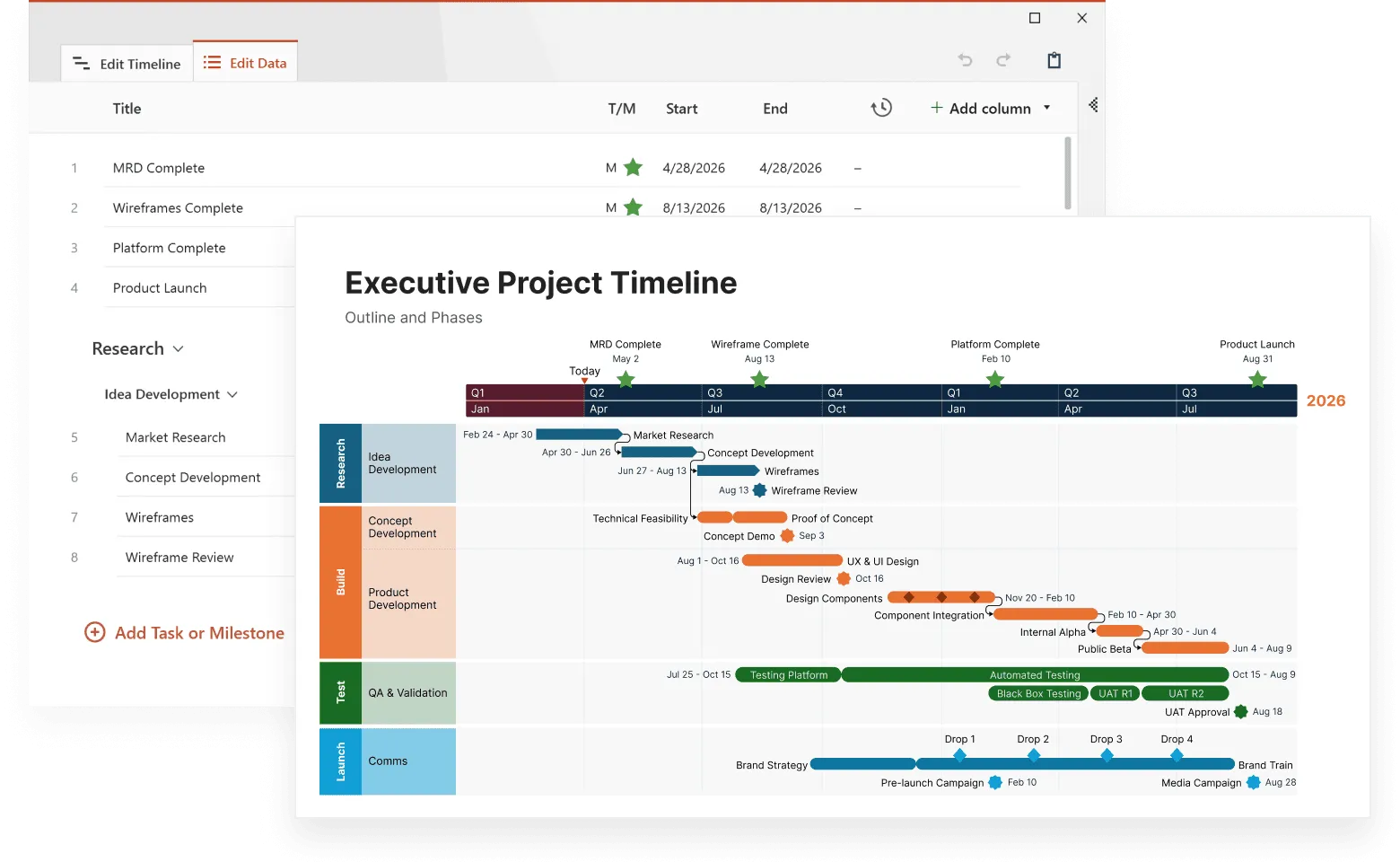
Interactive timelines turn chronological data into clickable experiences. Instead of sitting through linear presentations, people can navigate information themselves, clicking for details, zooming between years, or filtering by topic.
The difference matters. Regular timelines show everything at once, which can be overwhelming. Interactive ones unfold step by step, matching how we naturally process information. When someone clicks on an event, they're actively choosing what interests them, and this keeps them engaged.
Interactive timelines make complex information easier to understand and more engaging. You can customize them for your specific audience and create professional-looking presentations even without design experience. People participate more because they're exploring rather than just listening.
Different fields use them effectively. History teachers create explorations where students can examine politics alongside culture during the same period. Project teams show how tasks connect over time in ways that make sense to everyone involved. Companies tell their stories through interactive formats that let investors, employees, and customers find what matters most to them.
Modern timeline software makes creation simple. What used to need custom coding now works through drag-and-drop interfaces. Templates cover common needs while letting you customize when necessary.
This article covers the best tools and proven methods for building interactive timelines that change how people experience chronological information.
Choosing the right tool
Selecting interactive timeline software directly affects what you can build and how quickly you can work. The market offers everything from simple drag-and-drop tools to complex platforms with advanced features.
Start with your requirements
List what your timeline needs to accomplish before comparing tools. Basic software handles simple chronological presentations, but complex projects need specific capabilities.
Consider these must-have features:
- data import from spreadsheets or databases;
- media support for images, videos, and audio files;
- interactive elements like filtering, zooming, and expandable content;
- multiple timeline tracks for showing parallel events.
A museum timeline might need extensive media embedding for historical photos and audio recordings. A project timeline requires dependency tracking and milestone highlighting. Match your needs to the tool's strengths.
Evaluate the user experience
The software interface determines how efficiently you can work. Look for these qualities:
- Learning curve - How long until you're productive with the tool?
- Template library - Are there starting points you can customize?
- Layout options - Can you adjust the format for your content?
- Team collaboration - Can multiple people edit simultaneously?
Drag-and-drop interfaces usually mean faster results. Tools requiring coding knowledge offer more customization but take longer to master.
Budget considerations
Timeline tools range from free to enterprise pricing:
- Free versions typically limit features or add watermarks
- Freemium models provide basic functionality with paid upgrades
- Monthly subscriptions offer full access for ongoing fees
- One-time purchases require upfront payment but no recurring costs
Calculate long-term value, not just initial price. A tool that costs more but saves hours of work often proves more economical. Check licensing terms if you plan commercial use.
Technical compatibility
Verify these technical requirements before choosing:
- Platform needs - Web-based or desktop installation?
- Output formats - Does it create files your presentation software can use?
- Integration options - Will it work with your existing tools?
- Data capacity - How does it perform with large numbers of events?
Some tools excel at web-based interactivity but struggle with offline presentations. Others create beautiful static outputs but lack true interactive features.
Matching tools to specific uses
Different timeline types favor different software:
Historical narratives need strong multimedia support and storytelling features.
Project management timelines require task dependencies and progress tracking.
Educational resources benefit from layered detail levels and engaging interactions.
Corporate presentations need professional templates and branding options.
The right match between your specific requirements and the tool's capabilities determines both your timeline's effectiveness and your creation efficiency.
1. Popular interactive timeline makers
The timeline software market includes tools ranging from simple spreadsheet-based solutions to sophisticated platforms with 3D visualization. Each takes a different approach to interactive timeline creation, with distinct strengths for specific use cases.
Timeline JS is an interactive timeline maker developed by Northwestern University's Knight Lab. It prioritizes simplicity and media integration and works through Google Spreadsheets for data entry, making it accessible to users without technical backgrounds.
Key features:
- Free and open-source
- Exceptional media support including Twitter, YouTube, Flickr, and Google Maps
- Clean, minimalist design focused on readability
- Spreadsheet-based data management
Timeline JS works well for news organizations and educators creating visual historical narratives. The spreadsheet approach limits complex customization but allows anyone comfortable with basic data entry to create professional timelines. The resulting timelines have a distinctive style that emphasizes media content and clear storytelling.
Tiki-Toki stands out for its visual customization options and unique 3D timeline capability. This tool appeals to users who want more control over visual presentation.
Distinctive aspects:
- 3D timeline visualization with spatial depth
- Web-based visual editor
- Freemium pricing model
- Collaboration features in paid versions
- Ability to highlight key events for better navigation
The 3D feature helps separate dense information by creating visual depth. This makes Tiki-Toki particularly useful for creative professionals and educators seeking visually distinctive presentations. The learning curve is steeper than spreadsheet alternatives, but the visual control justifies the extra effort.
Preceden focuses on organizing complex timelines through a layer-based system. It excels at handling multiple event types and large datasets.
Organizational strengths:
- Layer-based timeline construction
- Strong filtering capabilities for large datasets
- Multiple export formats (PDF, PNG, HTML)
- Business-focused features
The layer system works exceptionally well for project planning, organizational histories, and multi-dimensional chronologies where relationships between different event types matter. Users can separate categories into distinct visual streams while maintaining overall chronological flow.
TimeGraphics combines chronological and geographical context, making it ideal for location-based storytelling.
Geographic capabilities:
- Map-based timeline integration
- Strong multimedia support
- Public timeline library and private options
- Balanced text and media presentation
This tool excels for historical timelines where location provides important context. The geographic visualization helps audiences connect events to places, enriching understanding of historical movements, business expansions, or travel narratives.
1.1. Choosing based on your priorities
Your specific needs should guide tool selection:
- Simplicity: Timeline JS offers the lowest entry barrier.
- Visual impact: Tiki-Toki provides unique 3D options.
- Technical flexibility: TimelineJS3 offers the most customization.
- Complex organization: Preceden excels at multi-layered timelines.
- Geographic context: TimeGraphics provides strong location-based features.
Consider your primary use case, technical comfort level, and integration requirements when selecting among these timeline creation platforms.
1.2. Implementation considerations
When selecting an interactive timeline maker, consider how each platform aligns with your goals and technical setup:
Interactivity depth
Determine whether you need basic event clicks or advanced features like zooming, filtering, or embedded multimedia. Tools like Tiki-Toki and TimeGraphics offer richer interactions, while Timeline JS focuses on simplicity.
Data input and management
Evaluate how the tool handles event data. Spreadsheet-driven options such as Timeline JS simplify data entry, while systems like Preceden and Tiki-Toki use custom interfaces better suited for complex projects.
Performance and loading speed
Heavily media-based or 3D timelines may require strong internet connections or modern browsers to render smoothly. Consider your audience’s device capabilities before choosing a platform with advanced visualization.
Export and embedding – Check whether timelines can be embedded in websites or exported to formats like HTML, PDF, or image files. Flexible export ensures long-term usability beyond the tool’s hosting environment.
Collaboration and sharing
For teams or classrooms, ensure your platform supports multi-user editing or secure sharing links. Some, like Tiki-Toki (paid plans), offer real-time collaboration, while others rely on external sharing options.
Cost and licensing
Open-source tools like Timeline JS are completely free, while others operate on freemium or subscription models. Factor in long-term access and potential feature restrictions in free versions.
1.3. Quick comparison guide
Easiest setup: Timeline JS - free, simple, spreadsheet-based creation.
Most visual impact: Tiki-Toki - stunning 3D presentation and customization.
Complex data organization: Preceden - layered timelines and strong filtering.
Location-based storytelling: TimeGraphics - combines maps with chronological flow.
Each of these interactive timeline makers offers distinct strengths. The right choice depends on your goals. Which do you value most?simplicity? visual impact? data depth? Selecting the right timeline tool means your story is not only accurate but also engaging and memorable.
2. Online interactive timeline makers
Web-based timeline tools eliminate software installation while offering accessibility from any device with internet access. These platforms work particularly well for teams spread across locations or users who switch between different computers.
Online timeline creators provide several practical benefits that desktop software cannot match:
- Universal access - Work from Windows, Mac, or Linux without compatibility issues
- Device flexibility - Create timelines on desktop computers, tablets, or smartphones
- No installation barriers - Bypass IT restrictions in corporate or educational settings
- Automatic updates - Always use the latest features without manual downloads
- Cloud storage - Reduce risk of losing work due to hardware failures
- Easy sharing - Generate links or embed codes for immediate distribution
These advantages make online tools ideal for educators moving between classrooms, professionals working from multiple locations, or international teams using different operating systems.
TimeToast focuses on straightforward timeline creation with minimal complexity. The platform emphasizes ease of use over advanced features.
Features include:
- Simple event entry system requiring no training
- Basic sharing and privacy controls
- Clean, readable output with intuitive navigation
- Public timeline library for inspiration
TimeToast works well for educational projects, basic historical presentations, and personal timelines. First-time creators appreciate the low learning curve, while the public gallery provides examples and ideas for new users.
Visme offers timeline creation within a comprehensive design platform that includes presentations, infographics, and other visual content.
Design-focused features:
- Professional templates with extensive customization
- Strong graphic design elements and styling controls
- Brand consistency tools and color palette options
- Integration with broader visual communication suite
Visme suits marketing professionals and educators who need timelines that match existing brand guidelines or fit within larger visual presentations. The design emphasis produces polished results, though sometimes with less interactive depth than specialized timeline tools.
ChronoFlo balances simplicity with useful customization options, including a distinctive timeline comparison feature.
Notable aspects:
- Multiple data entry methods including spreadsheet import
- Various timeline formats (horizontal, vertical, serpentine)
- Web embedding and direct URL sharing
- Side-by-side timeline comparison capabilities
The comparison functionality sets ChronoFlo apart, allowing creators to show relationships between parallel chronologies. This proves valuable for comparative historical analysis, multi-project tracking, or showing how different events unfolded simultaneously.
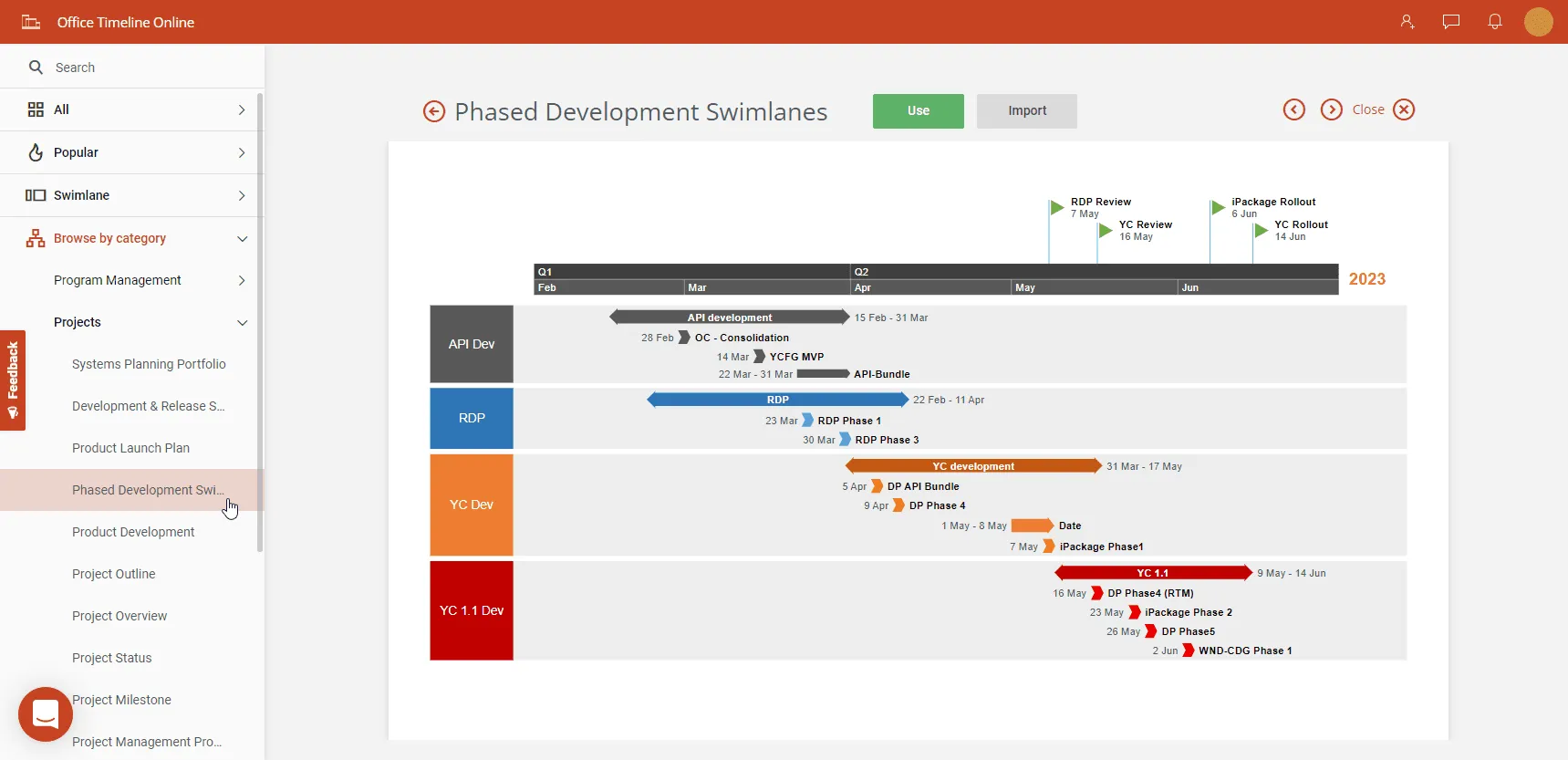
Office Timeline Online provides a streamlined way to build professional, presentation-ready timelines directly in the browser. It focuses on clarity, speed, and ease of use rather than deep interactivity, making it ideal for business reports, stakeholder updates, and project overviews.
Key benefits:
- Intuitive drag-and-drop timeline creation
- Polished, presentation-focused templates
- Cloud saving for access across devices
- Easy export to PowerPoint or image formats
- Simple collaboration through link sharing
Its strength lies in producing clean, executive-ready visuals quickly, especially useful when timelines need to fit into broader project documentation or presentations.
2.1. Implementation considerations
When selecting online timeline tools, evaluate these practical factors:
Internet dependency affects both creation and presentation. Fully cloud-based tools require consistent connectivity, while some offer offline modes for uninterrupted work during travel or outages.
Data security matters for sensitive content. Review privacy policies and data handling practices, especially for corporate or confidential historical information. Look for platforms with clear encryption standards.
Export compatibility determines how you can use finished timelines. Verify that your chosen tool outputs formats compatible with your presentation platform—whether you need PowerPoint integration, standalone HTML files, or website embedding capabilities.
Account management affects team collaboration. Some tools require individual logins for each collaborator, potentially creating administrative challenges in large teams or educational settings where shared access might work better.
Long-term accessibility impacts timeline availability over time. Free tools may limit access to exported content, while subscription services might make timelines inaccessible if payments lapse. Consider whether you need ongoing availability or just temporary presentation access.
2.2. Quick comparison guide
- Easiest to use: TimeToast
- Best for location-based stories: MyHistro
- Most design control: Visme
- Timeline comparison: ChronoFlo
- Cleanest business-ready visuals: Office Timeline Online
- Overall versatility: Depends on specific needs and technical comfort level
These practical considerations help ensure your timeline remains functional throughout its intended use, whether for a single presentation or ongoing educational resource.
Build better timelines online
Craft clear, polished timeline visuals. Zero installation, zero cost.
Designing beautiful interactive timelines
Creating effective interactive timelines requires balancing visual appeal with usability. A well-designed timeline presents chronological information clearly while creating an intuitive experience that helps viewers understand connections between events.
Visual design fundamentals
Strong timeline design starts with these core principles:
- Visual hierarchy guides attention by varying element size and prominence based on importance. Major events appear larger or use distinctive markers, while supporting details remain visually secondary. This creates a clear reading path through your timeline.
- White space prevents visual overwhelm by providing breathing room between elements. Crowded timelines create cognitive fatigue and make information harder to process. Strategic spacing helps viewers focus on individual events without losing sight of the overall chronology.
- Typography affects both readability and thematic consistency. Timeline text often appears small, so choose fonts that remain legible when reduced. Limit yourself to 2-3 font families to maintain visual cohesion throughout the timeline.
- Color psychology influences emotional response and creates associations. Historical timelines often use sepia or muted tones to suggest age, while corporate timelines incorporate brand colors for recognition. Select a cohesive color palette that supports your content theme and maintains visual harmony.
- Consistent styling creates a visual system that helps viewers interpret information quickly. Maintain uniform treatment of similar elements—all major milestones should look similar, all supporting events should share visual characteristics.
A timeline depicting technological evolution might use cool blues and greens to represent innovation, with consistent iconography for different categories of breakthroughs.
Engagement principles
Interactive timelines succeed when they invite exploration rather than passive viewing:
- Progressive disclosure presents information in layers. Summary data appears initially, with details available through interaction. This prevents information overload while satisfying viewers who want deeper information.
- Intuitive navigation provides clear controls for timeline exploration. Standard conventions include horizontal scrolling for time progression and clicking events for additional details. Users should understand how to navigate without instructions.
- Meaningful animations use motion purposefully to illustrate relationships or time passage. Subtle transitions between views help maintain context as users explore different sections. Avoid animations that distract from content.
- Multimedia integration incorporates relevant images, videos, or audio that enhance understanding. A civil rights timeline becomes more impactful with authentic photographs and speech recordings. Choose media that adds context rather than decoration.
- Feedback mechanisms provide visual responses to user interactions. Highlight selected events, change cursor appearance over clickable elements, or use subtle color changes to show active states.
A historical timeline about architectural evolution might initially show building silhouettes, then reveal detailed photographs, floor plans, and video walkthroughs when users click specific structures.
Step-by-step creation process
Follow this systematic approach for effective interactive timelines:
- Define scope and purpose - Determine specific objectives and audience before beginning design. A scientific timeline for researchers requires different choices than an educational timeline for students.
- Collect and organize data - Gather all events, dates, and supporting media. Organize information into primary and secondary events, identifying natural groupings or categories.
- Select appropriate scale - Choose a time scale that accommodates your data meaningfully. Some topics require precise hourly tracking, while others span centuries with significant gaps.
- Create visual structure - Design the basic framework including orientation (horizontal, vertical, or spiral), navigation elements, and event markers.
- Apply visual treatments - Add colors, typography, and styling elements that support your content theme and enhance understanding.
- Integrate interactive elements - Implement clickable areas, filters, zooming capabilities, and multimedia components that encourage exploration.
- Test for usability - Have representative users interact with your timeline, observing navigation patterns and identifying friction points.
- Refine based on feedback - Make iterative improvements to address confusion or technical issues discovered during testing.
Interactive timeline features
Modern timeline tools provide capabilities that transform static chronologies into dynamic exploration tools. These features enable viewers to engage with information actively rather than passively consuming predetermined sequences.
Core interactive capabilities
- Filtering and categorization allow viewers to focus on specific event types. A world history timeline might let users display only scientific discoveries, political changes, or cultural developments. This selective viewing helps audiences find relevant information without distraction from unrelated events.
- Zooming and scaling enable movement between overview and detail levels. Users can start with a decade-level perspective, then zoom into specific years or even days during periods of particular interest. This flexibility accommodates different information needs within the same timeline.
- Connecting lines and relationships illustrate cause-effect connections between events through visual connectors. These appear when users select relevant items, showing how earlier events influenced later developments. Graphics enhance these relationship illustrations, making complex connections clearer.
- Interactive media elements embed playable videos, audio clips, or documents directly within timeline events. Instead of linking away from the timeline, users can engage with multimedia content while maintaining their chronological context. Animated graphics can enhance visual appeal and explanation of complex concepts.
- Search functionality provides text-based navigation for extensive timelines. Users can locate specific events, people, or themes without scrolling through entire chronologies. This proves particularly valuable for reference timelines covering long periods or numerous events.
- Branching pathways create alternative scenario exploration, especially useful for strategic planning or historical analysis. Users can explore "what if" scenarios or see how different decisions led to different outcomes.
A pandemic timeline might include filtering for global statistics versus policy responses, with interactive graphs showing data changes when different time periods are selected.
Sharing and distribution options
Interactive timelines offer multiple ways to reach different audiences:
- Embedded web integration places timelines directly within existing websites or learning management systems while maintaining full interactivity. Generating embed code for website integration is straightforward and enhances user engagement.
- Standalone URLs provide direct timeline access without requiring navigation through parent sites. This works well for email distribution or direct sharing.
- Presentation mode converts interactive timelines into guided formats for live delivery, giving presenters control over pace and focus while maintaining interactive elements for audience questions.
- Social media sharing generates optimized timeline previews for platforms like Facebook or LinkedIn, with links to the full interactive version for interested viewers.
- Static format exports create PDFs or images for situations where interactive capabilities aren't supported, such as printed materials or basic email attachments.
- QR code access generates codes linking to timelines, useful for physical materials like posters, handouts, or museum exhibits.
A museum might embed an artifact timeline on their website, share direct links in newsletters, use presentation mode for guided tours, share preview images on Instagram, generate PDFs for visitors without smartphones, and place QR codes near physical exhibits.
Template systems
Templates accelerate creation while ensuring professional results:
- Industry-specific templates provide pre-designed frameworks for common applications like project management, historical education, or corporate histories. Timeline templates for various purposes, including biographical information or company history, can be customized to meet specific needs.
- Visual theme templates offer coordinated design systems with matching colors, fonts, and styling elements that maintain consistency throughout the timeline.
- Layout templates present various timeline orientations—horizontal scrolling, vertical progression, or circular arrangements. Creating an outline before designing helps map essential elements and ensures comprehensive content inclusion.
- Interactive behavior templates implement pre-configured interaction patterns like zoom-to-detail or category filtering systems, saving development time while ensuring smooth user experience.
- Narrative templates use story-driven frameworks that guide viewers through predetermined sequences before allowing free exploration.
Marketing teams might start with a product launch template, adapt colors to match brand guidelines, adjust layouts to emphasize campaign dates, and modify interactions to highlight customer testimonials.
Real-time collaboration
Modern timeline tools support team-based creation through several collaborative features:
- Simultaneous editing allows multiple team members to work on different sections concurrently, similar to Google Docs collaboration. Using Google Spreadsheets for data entry ensures real-time updates from all team members.
- Comment and feedback systems enable reviewers to leave specific notes tied to timeline elements without directly editing content, maintaining version integrity while gathering input.
- Version control tracks changes and allows reversion to previous iterations when needed, protecting against accidental deletions or unwanted modifications.
- Role-based permissions assign different access levels based on team responsibilities, from view-only access to full editing capabilities.
- Notification systems alert team members when changes occur or comments require attention, keeping everyone informed about timeline development progress.
Product development timelines might incorporate marketing launch dates, engineering milestones, and customer feedback periods, with respective departments maintaining their sections while seeing the complete context.
Advanced functionality
Sophisticated timeline projects benefit from these enhanced capabilities:
- Data connectivity links timelines to live data sources that update automatically when underlying information changes. Google Spreadsheets can configure timelines, pull media automatically, and enable ongoing content editing.
- Conditional formatting applies visual treatments based on data values, color-coding events by category or sizing markers proportionally to significance metrics.
- Custom interactions develop specialized behaviors unique to specific communication needs, going beyond standard clicking and zooming.
- Analytics integration tracks user interactions to identify which elements generate most engagement. Google Analytics integration provides comprehensive tracking and enhanced functionality insights.
- Accessibility enhancements implement screen reader support, keyboard navigation, and other features ensuring universal timeline access.
A public health timeline could connect to current disease statistics, color-code regions based on case rates, create custom interactions for exploring prevention measures, track which preventive measures viewers investigate most, and include audio descriptions for visually impaired users.
Real-world uses for interactive timelines
Corporate applications demonstrate how interactive timelines serve business communication needs. When creating a company history timeline, start with major milestones like founding dates, key product launches, and expansion events. Design a horizontal layout using company brand colors. Add founder photographs and product images to create visual interest. Implement pop-up detail cards for deeper information. Test with stakeholders from different departments, then refine navigation controls based on their feedback about valuable information and preferred exploration methods.
Interactive timelines prove invaluable for project management and communication. Tools like Tiki-Toki enable project managers to create custom timelines with milestones, deadlines, and task assignments, plus multimedia elements providing context. By visualizing project timelines, businesses can identify bottlenecks and inefficiencies, making data-driven decisions to optimize workflows. This transparency improves communication with team members and stakeholders, ensuring alignment and accountability.
Educational applications show how timelines engage students with historical events and concepts dynamically. Tools like Timeline JS allow educators to create custom timelines incorporating images, videos, and multimedia elements that bring history to life in classrooms.
Interactive timelines help students develop critical thinking skills by analyzing cause-effect relationships, identifying patterns, and exploring historical events immersively. This hands-on learning approach makes historical events more relatable and memorable. Educators can create timelines focusing on specific themes or periods, allowing deep topic exploration tailored to curriculum and student learning needs.
The key to successful timeline design lies in understanding your audience's needs and creating an experience that serves both overview browsing and detailed exploration, whether for business stakeholders seeking strategic insights or students exploring historical connections.
Wrapping up: where your timeline story begins
Interactive timelines have grown from simple date lists into engaging storytelling tools. Modern software makes creating visual chronologies easy for anyone without technical skills.
The best interactive timelines balance good design with clear information, turning abstract dates into concrete experiences that show patterns and connections. They work equally well for history lessons, business presentations, or museum displays by organizing time-based information visually while encouraging exploration.
Start with story, not technology
When creating your timeline, focus on what you want to communicate rather than fancy features. Choose tools that fit your specific needs and design for your audience's comfort level. Interactive elements should help understanding, not distract from your message.
The field keeps advancing with AI and virtual reality promising better experiences ahead. Yet basic principles stay the same: clear communication, easy navigation, and useful interactions determine success regardless of the technology.
Begin creating
Whether showing history, mapping projects, or highlighting achievements, interactive timelines turn time into an explorable space where relationships become visible and stories unfold naturally.
Your timeline creation starts with these tools and techniques, but success depends on your vision and the stories you want to tell. Focus on helping others discover the connections that make chronological information meaningful.
Start with your story, choose tools carefully, and create timelines that turn passive viewers into engaged participants in your chronological narrative.
Frequently asked questions
Interactive timeline creation raises common questions about functionality, technical requirements, and best practices. These answers address the most frequent concerns from actual users exploring timeline tools for their projects.
Most modern timeline makers work like simplified website builders with drag-and-drop interfaces. Tools like Timeline JS use Google Spreadsheets for data entry, while platforms like Tiki-Toki offer visual editors with templates. You can create professional interactive timelines using these tools without any programming knowledge.
Static timelines show all information at once without user control beyond basic viewing. Interactive timelines let people:
- Click on events for additional details
- Zoom in and out of different time periods
- Filter content by categories or themes
- Explore at their own pace and interest level
Your choice depends on your specific needs:
- Timeline JS: Best for simple, media-rich timelines using Google Spreadsheets
- Tiki-Toki: Offers 3D visualization and extensive design control
- Preceden: Excels at complex, multi-layered business timelines
- TimeGraphics: Works best when location context matters alongside chronology
Most timeline tools generate web links you can share directly or embed codes for websites. For presentations, look for tools offering PowerPoint compatibility or presentation modes. You can also export static versions as PDFs or images when full interactivity isn't needed.
Choose timeline creation tools that specifically mention mobile compatibility or responsive design. Test your timeline on different screen sizes before sharing, and make sure clickable elements are large enough for touch navigation.
This depends entirely on your purpose:
- Educational timelines: 15-30 significant events work well
- Business project timelines: Can include hundreds of tasks when organized by categories
- Historical narratives: Focus on major milestones with supporting details available through clicks
The important factor is providing clear organization and filtering options as your event count grows.
Many timeline tools support team collaboration through features like simultaneous editing, comment systems, and role-based permissions. This works particularly well for complex projects requiring input from multiple departments or team members.