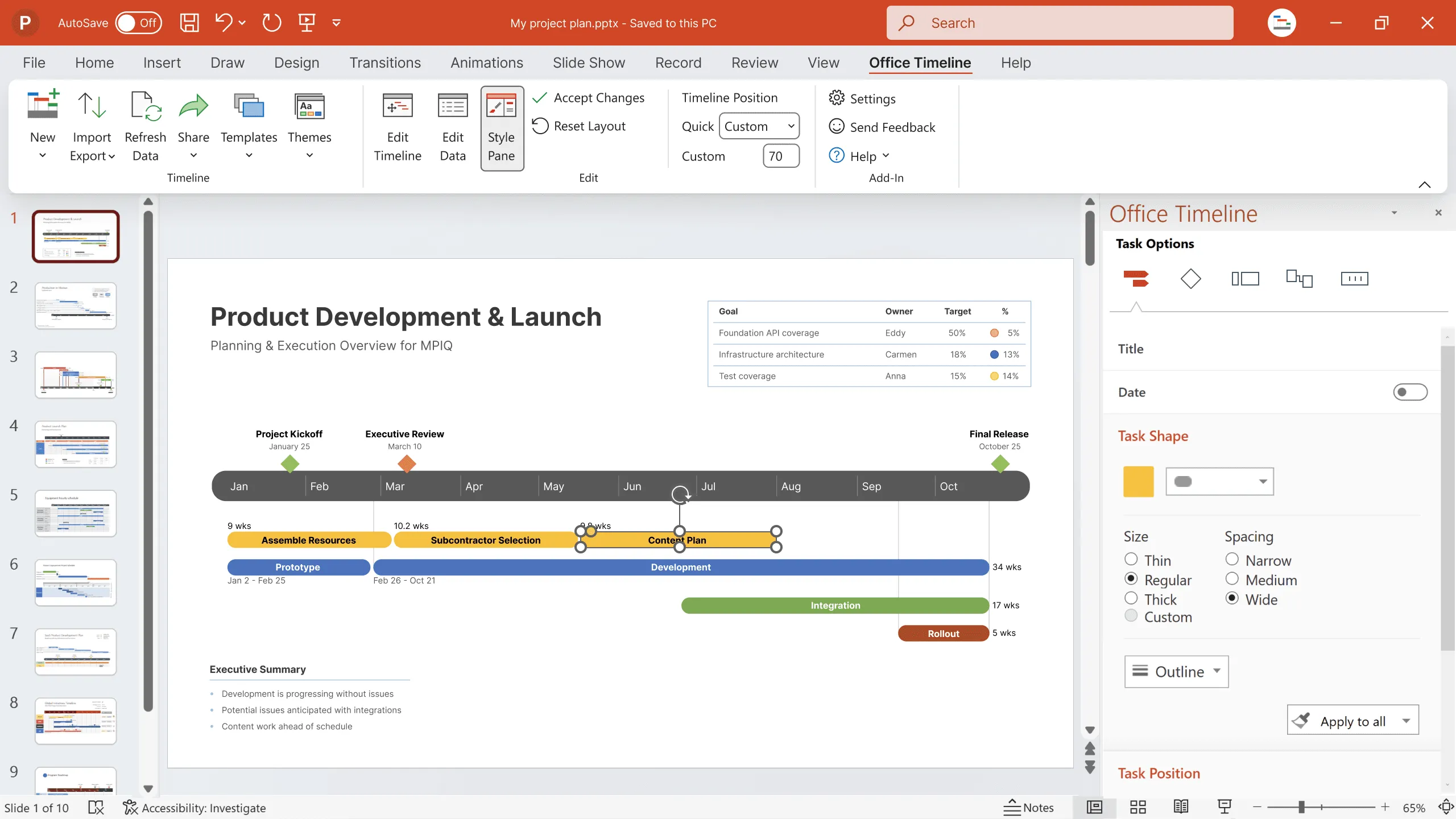
2025 in review: your wins, powered by Office Timeline. What’s next? 📈
See how your feedback shaped Office Timeline in 2025, the features we shipped to make project updates faster, clearer, and easier to trust, and what’s coming in 2026.


Explain complex data with visuals
First things first: thank you! Every feature request you sent, every workflow you shared, every “what if you could...” conversation - they shaped what Office Timeline became in 2025. You trusted us with your project challenges, and that matters more than you know.
2025 hit different, didn’t it? Whether you were managing IT rollouts, steering PMO initiatives, or trying to explain complex business transformations, the same challenge kept coming up: how do you show what’s actually happening quickly, clearly, and in a way people understand?
You told us about:
- The exec who needs to understand six months of work in thirty seconds;
- The stakeholder who asks, “but what does this mean for my team?”;
- The client who wants proof that yes, you’re on track, and here’s exactly how.
Making complicated work click for everyone is exhausting. You shouldn’t have to fight your tools just to explain what’s going on in your project.
Throughout 2025, every improvement was about making that part easier, showing progress clearly, without the slide marathons, manual updates, or last-minute stress.
Looking back, it really came down to time. Less time formatting. Less time explaining how to read a timeline. More time actually talking about decisions, risks, and what needs to happen next.
That’s what 2025 was about. And it’s what we’re building toward next.
The product updates you asked for
This year, we built around your feedback, focusing on making project communication easier.

When "show me what's really happening" became a feature: Planned vs. Actual
Remember all those times you had to manually update slides to show plan versus reality? We shipped Planned vs. Actual - our answer to your most common reporting headache. This Expert-level feature gives you that side-by-side view executives always ask for: here’s what we said would happen, here’s what’s actually happening.
Now you can spot schedule risks before they blow up, turn those status meetings into actual strategy discussions, moving beyond “what happened” to “what we do next.” Instead of just reading slide after slide, show stakeholders exactly why things shifted with visual proof, not lengthy explanations. The best part? Your timeline updates itself. No more Sunday night slide scrambles before Monday’s review.
The setup that doesn't feel like homework: a faster, smarter Timeline Wizard and streamlined Style Pane
This spring, we completely rebuilt the Timeline Wizard because you were right: creating that first timeline shouldn't take an hour of clicking around.
Now you get:
- Guided setup and smart templates that actually match what you're building.
- A polished timeline ready in minutes, even if you’re starting from scratch.
- Instant data imports that pull in your project info without the copy-paste marathon.
We also streamlined the Style Pane so one click updates your entire timeline's look. No more changing each element individually, just instant consistent visuals. The contextual advanced features show up naturally when you need them, not cluttering your screen when you don't.
Bottom line: you get from blank slide to professional timeline in minutes, not hours.
Making edits without the rage clicks: Edit Timeline view redesigned
February brought our redesigned Edit Timeline view - because dragging tasks around shouldn't require a computer science degree.
We added:
- Proper drag-and-drop handles (finally);
- Smart visual guides that keep everything aligned without any effort;
- Selection states that actually show what you're editing.
Plus better contrast and borders so everyone can read your timelines, including that exec who refuses to wear their glasses in meetings.
These might sound like small things, but we know they're the difference between “I'll just update this quickly” and throwing your mouse across the room.
The login that just works: Account-based Licensing
This fall, we updated our login system to make getting into Office Timeline faster, simpler, and more secure.
Account-based Licensing means:
- You sign in with your work email - no product key, no extra hassle;
- You can use your Google, or Microsoft account for quick, secure access across your devices;
- No more password sticky notes, no more IT tickets for access, no more digging through purchase emails from 2019.
Plus, your IT team gets a single dashboard to manage licenses, showing who's using what (they love this part). It's one of those updates that seems small until you realize how much friction it removes from your day. Logging in should be invisible, not a project. Now it is.
Your Google Workspace, now with actual timelines
For everyone living in both PowerPoint and Google Workspace (which is basically everyone these days), we built native Google integration in Office Timeline Online. Import from Sheets, insert into Docs, present in Slides, all without the export-import-update dance.
Your timeline stays synced everywhere, no matter where your team works, so when you update it once, every document reflects the change. No more “which version is current?” panic.
New solutions for visual reporting arriving in 2026
Two new tools are taking shape right now, both born from your messages asking, “why isn't there something for this?”. Your feedback will play an important role in shaping these tools ahead of their launch in 2026.
- Office Flowchart makes it easier to create professional process visuals directly in PowerPoint, without struggling with shapes and connectors. It supports everything from simple workflows to more detailed decision trees.
- Office Plan brings visual project tracking into Excel, turning existing data into clear, structured project plans with timelines and dependencies, without moving work between tools.
This is your chance to influence what these tools become before they launch in 2026. The best features always come from people using them to solve real problems. Join the beta, break things, tell us what's missing.
How we grew together
This year brought some big changes that strengthen what we can do for you. We acquired Timeneye, the time tracking and productivity tool, because you told us time tracking and timeline management shouldn't live in separate universes. Now they don't.
Here's how it works: Office Timeline gives you the visual project plan - the story you tell stakeholders. Timeneye shows you what's actually happening - the real time spent, the actual effort involved. Together, they give you complete visibility from that optimistic kickoff meeting all the way through to “yes, we actually shipped it.”
Both tools continue to operate independently (no forced migrations, no disrupted workflows), but now they work seamlessly in your Microsoft environment. You can track time spent and show progress made without jumping between platforms. It's planning and reality, finally in the same conversation.
We're exploring even more ways to connect these tools into what you really need: a complete project performance ecosystem that just works. No more explaining why your beautiful timeline doesn't match your timesheet data. They're telling the same story now.
We also teamed up with the Project Management Institute (PMI) on research that proved what you've been saying all along: visual timelines aren't just nice-to-haves, they're game-changers. The data backs you up: PMs using Office Timeline save an average of 4 hours per week. That's 200 hours a year you get back for actual project work instead of slide formatting.
And because the best product recommendations come from people who actually use it, we launched our referral program. When you share Office Timeline with someone drowning in project chaos, you both get a $50 gift card. It's our way of saying thanks for spreading the word about what works.
Next up in 2026: the tools you've been waiting for
Remember how we said everything we built came from your feedback? Well, you've been pretty clear about what's next: you want all your project communication tools to actually talk to each other. Not just export-import, but genuinely connected. Living in the same space. Speaking the same language.
So that's what we're building. Office Timeline is evolving into something bigger: your Microsoft-native clarity platform. Basically, we're taking everything that makes project work messy (the reporting, the tracking, the “wait, which version is this?” moments) and bringing it together where you already work.
The goal? Create a simpler, clearer way to run and explain projects. We're listening, we're building, and we're ready for what you tell us next.
Eddy is Founder & Chief Product Officer for Office Timeline, building a user-friendly but powerful app that makes timelines, Gantt charts and roadmaps directly in PowerPoint.
Turn project data into professional timelines
Get the advanced features of Office Timeline free for 14 days.