
Reclaiming hundreds of work hours to focus on managing projects
A leading global technology company specializing in computing hardware and AI solutions needed to simplify project planning so that managers could prioritize problem solving. Office Timeline helped turn complex engineering projects into easy-to-understand visuals while cutting plan-building time from hours to minutes.
Office Timeline could take a very complex project and boil it down into something that people around the world could understand, regardless of language barriers, time zone differences, or other challenges going on.
Global technology company simplifies planning and progress communication with Office Timeline
‘How can you succeed if you don't have a plan? How can you communicate the plan if you don't have it written down?' For technology program and project managers, these questions are at the heart of everything they do to align teams, update executives, and keep projects moving forward.
Yet the tools most of these managers rely on, such as Excel and PowerPoint, can only do so much. Building and updating project plans manually is time-consuming, pulling highly skilled professionals away from problem solving, data-driven decision making, and cross-functional coordination.
When those manually built visuals are hard to follow, the cost goes beyond lost time. Miscommunication and misalignment follow, impacting a company's ability to stay competitive in a fast-changing market.
Need for a time-efficient project plan visualization tool
For a US-based global technology company designing and manufacturing computing hardware, this challenge was a daily reality. With engineering teams working on projects whose outcomes directly impacted the company's product lines, efficient and clear communication was critical.
Heather, a technology program manager at a leading global technology company, knew that manually building project plans was time-consuming, but after decades of doing so, the process was already second nature. She had managed teams of 12 to 200 people over her 22-year tenure with the company and had communicated with diverse audiences from internal teams of engineers to senior executives, mainly through visuals.
“For my whole career, I'd been using Excel for a very detailed plan, if I knew I needed to take something apart and put it back together. If I needed something very high level, I'd use PowerPoint,” says Heather.
However, it wasn’t until Heather was assigned a 3-month high-stakes project that she realized the old way of doing plans wouldn’t work: “I cannot manage an internal team to execute this project if I have to draw all these different versions of the plan to try to convey what I need people to do and also communicate what's going on to the customer.”
To make matters even more difficult, English wasn't always the client's native language and they were located in opposite time zones. So communicating with senior executives and engineering managers on the client side required visuals that conveyed the plan and project status better than words alone.
A positive first experience with Office Timeline
With the project’s success and her professional reputation on the line, Heather started looking for a solution online. She needed a user-friendly tool that could turn detailed plans into clear, professional visuals, make updates effortless, and allow her to easily tailor them for different audiences.
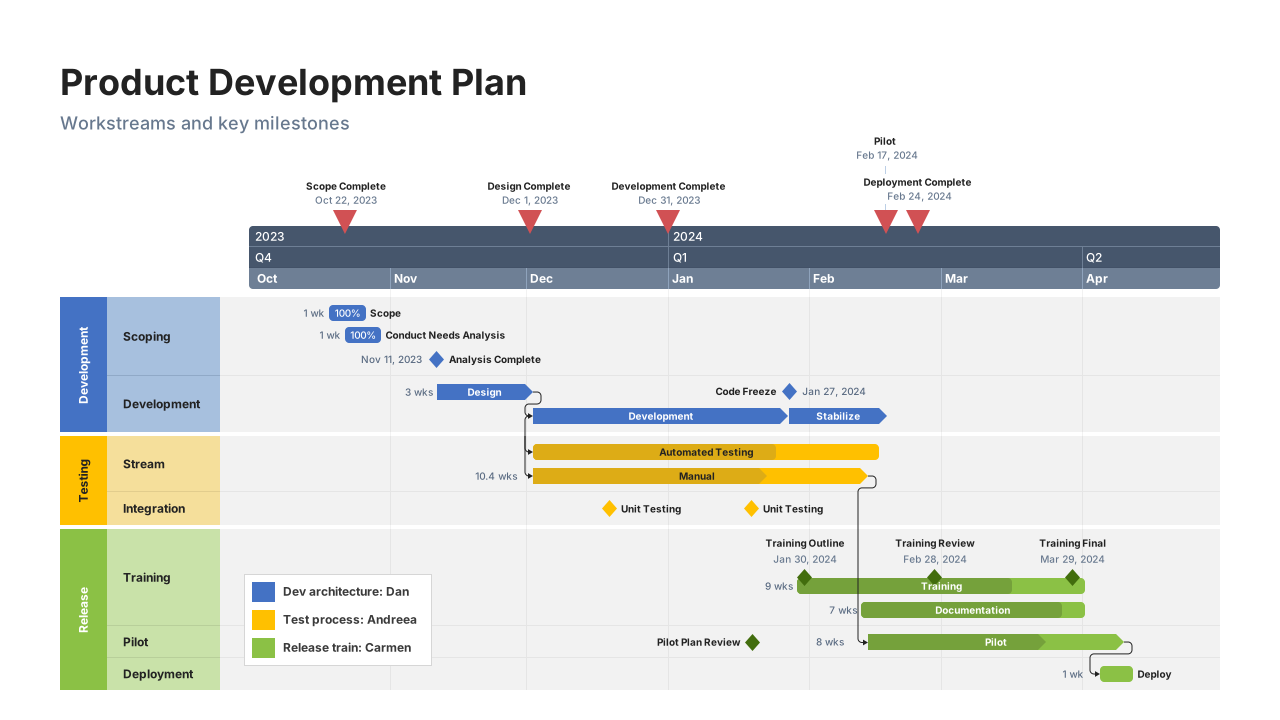
A Google search led Heather to the Office Timeline PowerPoint plug-in and she decided to purchase a license. Even as a first-time user, she was impressed by its ease of use and the ability to pull in data directly from Excel and quickly customize visuals depending on what she needed to communicate during weekly status meetings.
“[Office Timeline] could take a very complex project and it could boil it down into something that people around the world could understand, regardless of language barriers, time zone differences, or other challenges going on. That was my first experience with the tool,” she says.
The tool proved so helpful during that project that she recommended it to everyone in the company who needed to build visual plans. Beyond planning, Heather also used Office Timeline to track execution as it allowed her to clearly communicate project status, highlight critical dependencies, flag problems, and capture changes as they happened.
Where building slides once took three to four hours, Office Timeline cut that time by more than 80%, to no more than half an hour. Overall, Heather estimates that since first using the tool in 2022, she has saved hundreds of hours on building and updating project plans.
“In 30 minutes, I can articulate this very complex multiple-swimlane plan, highlighting what needs to be highlighted, and build upon it. I can then update it in 10 minutes to reflect a change or a new scenario that we need to look at,” she says.
Driving team alignment and accountability
Although Heather doesn't consider herself a power user, Office Timeline's impact on her work has already extended far beyond her own projects. Her roadmaps have been seen across the company, giving both engineering teams and executives a clear picture of ongoing work and the technology being delivered.
Beyond supporting effective project communication, the tool helped Heather drive team accountability. With a clear, shared visual plan, the dozens of engineers she managed knew the order of operations, the dependencies, and exactly when each task was due.
For Heather, the plan isn't just a roadmap. It's a contract she uses to align her team and hold them accountable throughout the project.
Features like swimlanes, sub-swimlanes, ready-made templates, colorful milestones, and a customizable timescale helped her build aesthetically pleasing, professional visuals every time. The common thread across all of Heather’s use cases is simplicity: taking something big and detailed and distilling it into a clear, focused visual that guides conversation and gets the key ideas across without clutter.
“In an engineering environment, people like black and white as it gets the point across. But with almost no effort on my part at all, I can go from a boring black and white palette to a beautiful template. If you want people to listen and pay attention, you show them something pleasing.”
The hide and show functionality alone transformed the way she works, allowing her to use a single plan for multiple audiences and objectives, showing only what's relevant for each meeting or stakeholder. The same feature made it easy for her to switch between multiple versions of an engineering execution plan without ever having to rebuild it from scratch.
Consolidating a professional reputation
These days, her plans never go unnoticed and speak to her professionalism.
“That's the response that I tend to get, which is people show up and say, ‘I need to know how to do that.’ Or ‘my boss says that you have this really good visual and I need to learn how to do that. Could you please show me?’ I've had these discussions three or four times just in the last six months alone.”
Without Office Timeline, Heather admits she wouldn’t have been able to perform at the levels her reputation demanded. More than that, her personal life and well-being would have suffered had she spent all those extra hours manually building and adjusting plans.
“My performance wouldn’t have been on brand for me. This tool has helped me be who people know I am, meet those expectations, and then raise the bar even more.”
That’s why she can’t help but recommend it to others who, as she did, struggle to build timelines and roadmaps. And when each one of her colleagues works more efficiently, the whole company wins. “It saves my company time and money because our people are spending more time on problem solving and less time drawing pictures to convey a plan,” says Heather.
About the organization
The client is a Fortune 500 technology company that designs and manufactures hardware solutions for computing, networking, and AI applications – serving businesses, data centers, and consumer markets worldwide.